 Expense IQ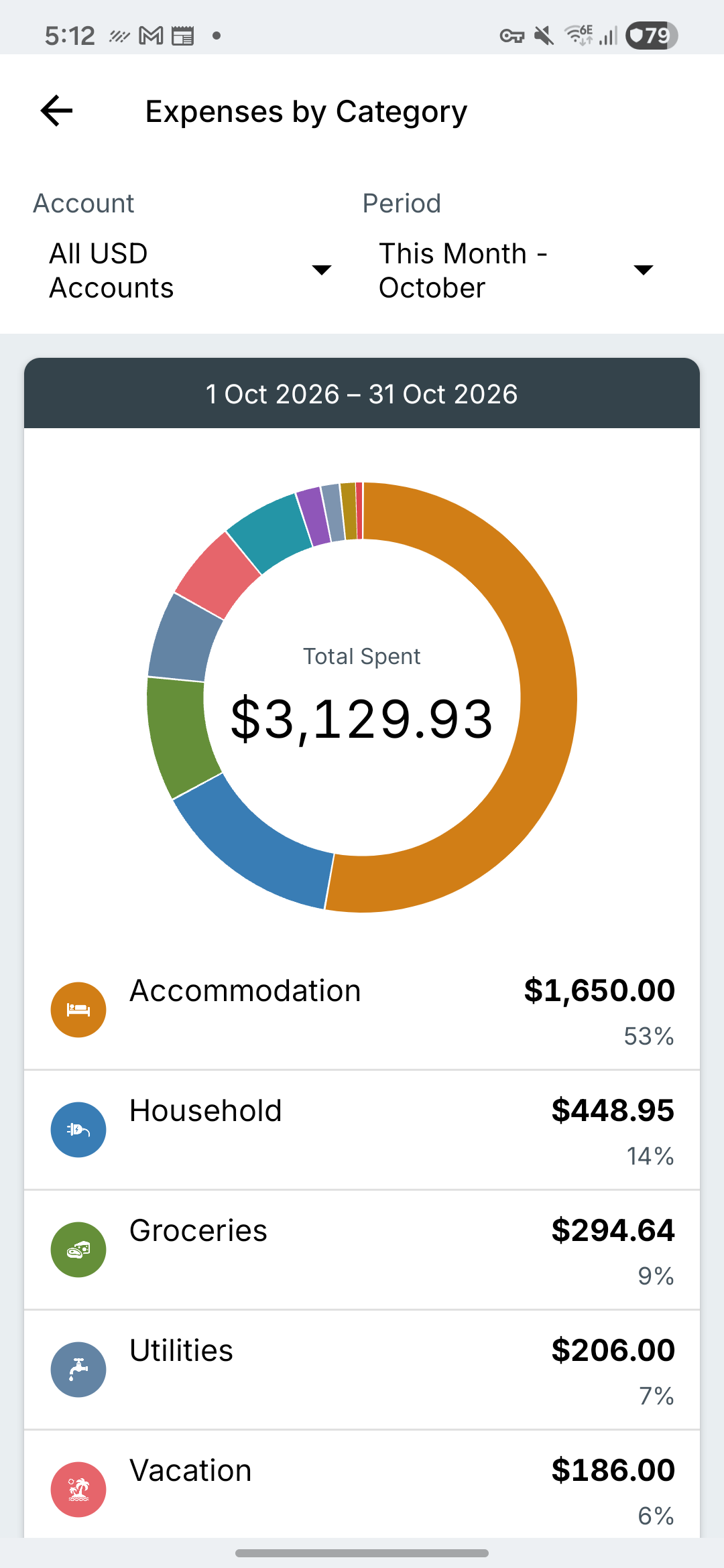
Choose the accounts and dates
“What did I spend this month?” needs a different scope from “What went on this card last week?” Choose the account or currency group and period that fit your question.
- Open Reports and choose Expenses by Category.
- Select the account or available account group.
- Select the period and check the displayed start and end dates.
- Read the category amounts as well as the chart.
Read amounts alongside percentages
A large chart slice means the category is a large part of the displayed total. It does not automatically mean the category is a problem. Rent may reasonably be larger than dining out.
In the sample screen, accommodation is $1,650 of a $3,129.93 total. Use the amount to understand what happened, then inspect the transactions if the result is unexpected. The screenshot uses fictional records.
Compare like with like
Use the same accounts, currency and comparable periods when comparing results. A partly completed month will usually differ from a full month. Transfers between your own accounts should not be mistaken for new purchases.
If a category looks wrong, open its detail and check the underlying entries. A duplicate, missing transaction or wrong date is a record problem to correct before changing your spending plan.