 Expense IQ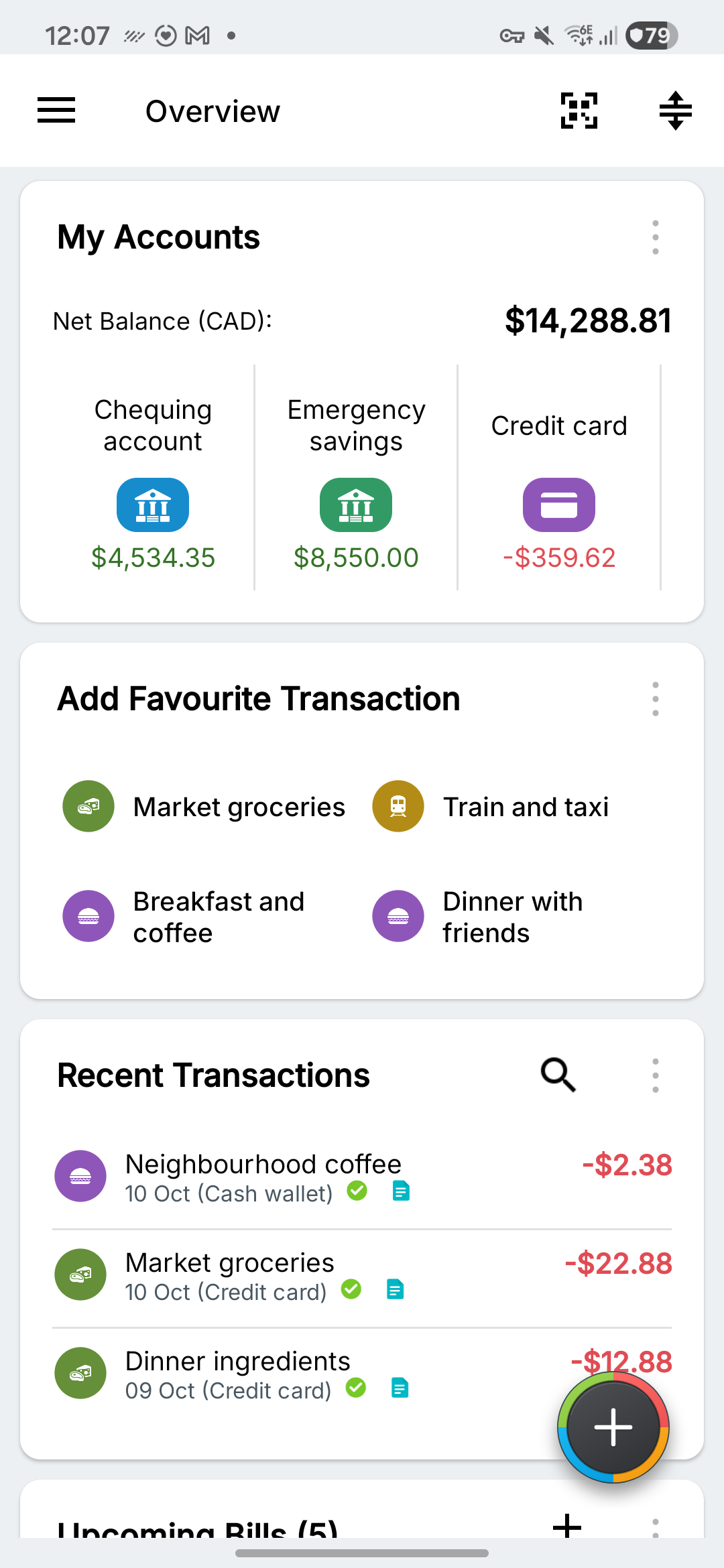
Start with your accounts
The My Accounts card shows recorded account balances. In this regional sample, the bank and savings balances are positive and the credit card balance is negative. The negative card balance represents money owed.
Check the currency beside each total. Compare these records with your bank statement or cash on hand when a balance looks wrong.
Use the cards that answer your questions
- My Accounts: what is the recorded balance in each account?
- Recent Transactions: did I enter today’s purchases in the right place?
- Add Favorite Transaction: can I start a familiar entry more quickly?
- Upcoming Bills: what is due soon?
Cards may appear further down the screen. Scroll through the Overview before assuming a card is missing. Open Settings → Customize Overview Page to choose the cards you want to see.
Make a short daily check
- Check the account you used today.
- Review recent transactions for the right amount, date and account.
- Look at upcoming bills before deciding what you can spend.
If an amount looks surprising, open the relevant account or transaction. Correct the entry that caused it rather than adding an unexplained balancing transaction.